RESTAURANT FOOD ROTATION STARTS WITH CLEAR DATE LABELS
Give employees an easier way to identify prepared and opened items, follow rotation procedures, and see the date information that matters during a busy shift.
Clear prep labels · Consistent date information · Easier storage review
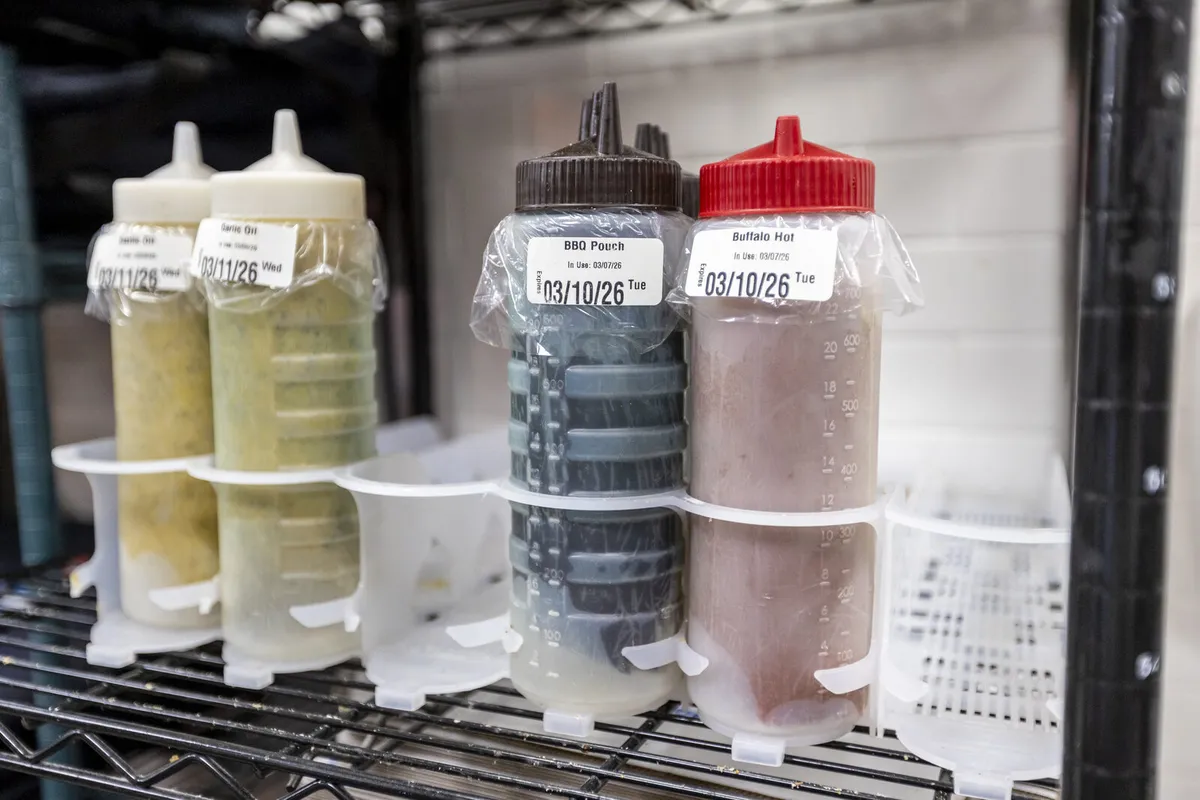
Keep product identity and date information visible while items move through prep, storage, and restocking.
IDENTIFY
Print clear labels so employees can see what an item is and which date information the restaurant tracks.
ROTATE
Organize storage and handoffs around the restaurant's approved rotation and FIFO procedures.
REVIEW
Keep labels visible during prep, restocking, and shift changes so missing or unclear information is easier to catch.
WHAT IS A RESTAURANT FOOD ROTATION SYSTEM?
A restaurant food rotation system is the set of practices employees use to organize and identify food as it moves through the kitchen. Many teams use first-in, first-out (FIFO) as a storage method when it fits the product and the restaurant's procedures: older inventory is positioned for use before newer inventory.
FIFO does not determine how long a food item may be stored. Restaurants should follow their food-safety program, applicable requirements, manufacturer guidance, and approved shelf-life procedures for each product. Labels help communicate the information the restaurant has chosen to track; they do not replace those underlying rules or employee checks.
DECIDE WHAT INFORMATION BELONGS ON EACH LABEL
A useful label gives employees the information they need without making them decipher handwriting or guess which container they are looking at. Depending on the item and the restaurant's policy, a label may include:
- The product or prepared item's name
- The preparation, opening, or receiving date and time when relevant
- The approved use-by or discard information for that item
- Employee initials or another identifier if required by the procedure
- Any additional handling note the team has approved
Keep label fields consistent across stations. Establish which date or time employees should record for different product types, and explain how to handle relabeling, damaged labels, or items with unclear histories. The restaurant's written policy should define the correct values; employees should not estimate dates from memory.
MAKE ROTATION EASIER TO FOLLOW DURING A SHIFT
A labeling process works best when it matches the physical layout of the kitchen. Store products in assigned areas, keep labels visible, and place items so employees can identify the product and its date information without moving several containers. When new inventory is stocked, the team can use the restaurant's rotation method to put products in the correct position.
Include rotation in the handoffs where it matters: receiving, prep, restocking, and shift change. A quick review can surface missing information, an item in the wrong location, or a label that no longer matches the product. The corrective step should follow the restaurant's food-safety procedures, including manager review where required.
CHOOSING FOOD LABELING TOOLS
A dedicated food label printer can help a restaurant produce labels in a consistent, easy-to-read format. Before choosing a system, confirm which label sizes and supplies it uses, what information can be printed, how employees enter or select that information, and whether the setup fits the kitchen's stations and volume.
Do not assume a printer automatically determines shelf life, calculates discard times, connects to inventory software, or records compliance data. Those capabilities depend on the specific device and software. Ask the provider to demonstrate the actual workflow with the label types and procedures your restaurant uses.
HOW LABEL KING TURBO FITS THE WORKFLOW
Label King Turbo provides food labeling products for restaurants, including food label printing tools. Restaurants evaluating a labeling setup can ask the Label King Turbo team about printer options, supported labels, and how the available setup would fit their prep and storage process. Confirm current product specifications and workflow details before selecting a solution.
MAKE DATE INFORMATION EASIER TO SEE
Explore restaurant food labeling tools and see how a printed workflow may fit your prep stations and storage process.
Explore Food LabelingFREQUENTLY ASKED QUESTIONS
What does FIFO mean in a restaurant kitchen?
FIFO means first-in, first-out. When it fits the product and the restaurant's written procedures, employees organize stock so older items are positioned for use before newer items.
What should a restaurant food label include?
That depends on the item and the restaurant's policy. Labels commonly identify the product and may include relevant preparation or opening information and approved use-by details. Follow applicable requirements and the restaurant's food-safety procedures.
Does a food label printer calculate discard dates?
Some systems may offer date-related functions, but capabilities vary. Confirm how dates are determined and entered for the exact printer and software setup; do not assume a printer establishes an item's shelf life.
Can labels replace a food-safety checklist or manager review?
No. Labels support identification and communication. They do not replace required checks, safe handling, corrective action, or manager oversight.
How can Label King Turbo help with food rotation?
Label King Turbo offers food labeling products that restaurants can evaluate as part of their labeling process. Ask the team about current printer and label options and confirm how they fit your procedures.
BUILD A FOOD ROTATION PROCESS YOUR TEAM CAN FOLLOW
Use clear date labels, organized storage, and consistent shift procedures to make product information easier to apply.