FOOD DATE LABEL PRINTER FOR RESTAURANTS
Make food date labels easier to read and repeat across prep stations, storage areas, and shift handoffs.
Clear item names · Consistent date fields · Easier prep and storage review
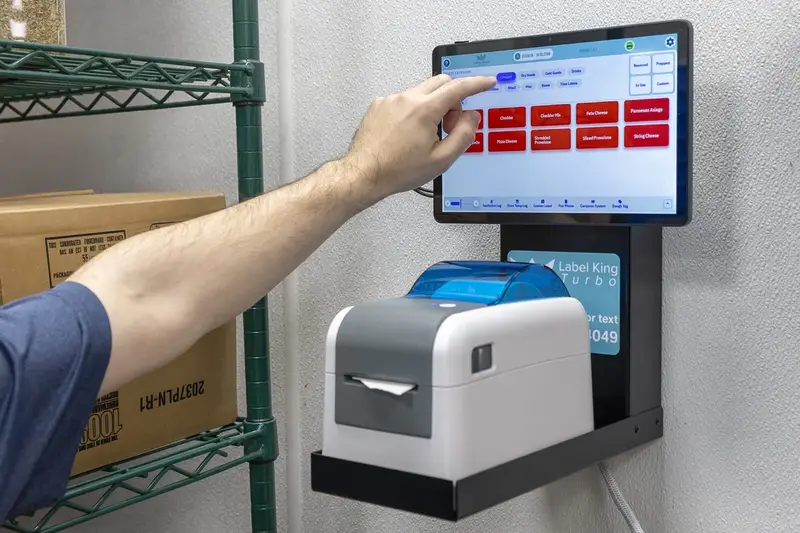
A dedicated printer can help teams produce legible labels without relying on handwriting that varies from station to station.
IDENTIFY
Print labels that make the item name and the date information your restaurant tracks easy to read.
ENTER
Give employees a consistent way to enter or select the required dates for each food category.
REVIEW
Add a quick check for unclear, incomplete, damaged, or mismatched labels before items move through storage.
MAKE FOOD DATE LABELS CLEAR ACROSS EVERY SHIFT
Restaurant teams prepare, open, portion, and store food throughout the day. Employees need a clear way to identify items and read the date information the restaurant uses. A food date label printer can help teams produce consistent, legible labels instead of relying on handwriting that may vary from one station or shift to another.
Label King Turbo includes food labels in its restaurant operations platform. For restaurants evaluating a food date label printer, the right setup should fit the kitchen's label materials, daily volume, date-entry process, and written food-safety procedures.
WHAT A FOOD DATE LABEL PRINTER DOES
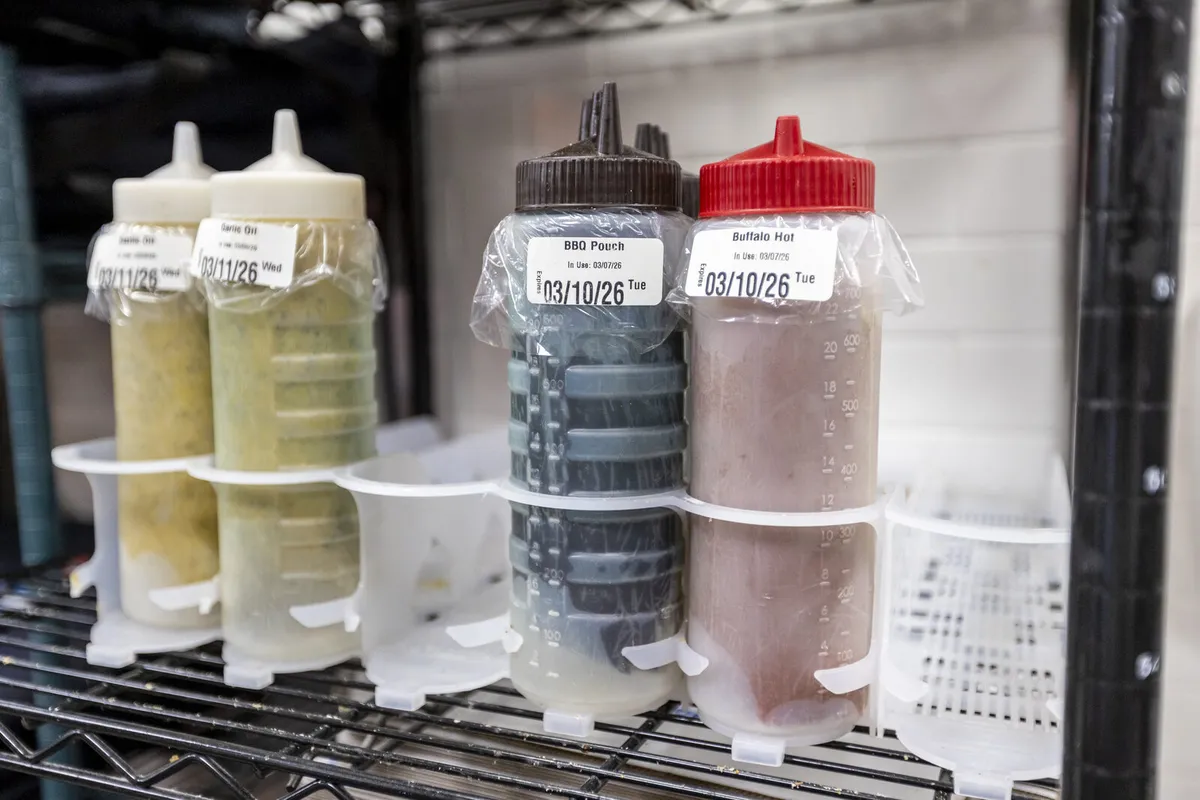
A food date label printer produces labels that identify prepared or stored items and display the information a restaurant has decided to track. Depending on the restaurant's procedures, a label may include:
- The item or prepared food name
- A preparation or opening date and time
- An approved use-by or discard date
- An employee identifier when required
- A handling note or other approved field
The printer supports communication; the restaurant's approved procedures determine what information belongs on each label and how dates are set. A label printer should not be assumed to establish an item's shelf life or replace safe handling, temperature checks, or manager review.
CHOOSE A SETUP THAT FITS YOUR KITCHEN
Before selecting a restaurant food date label printer, review how labels will be used from prep through storage:
- Label stock and surfaces: confirm that available labels suit the containers, storage conditions, and handling time in your operation.
- Information and layout: check that employees can identify the item and read the required date details quickly.
- Date-entry workflow: understand how staff enter or select dates, who verifies them, and what happens when information is missing.
- Kitchen volume and placement: match the setup to the number of labels each station needs and where employees will print and apply them.
- Current product specifications: confirm the exact printer, label, and software configuration before relying on a feature.
BUILD A REPEATABLE DATE-LABELING PROCESS
A printer works best when every station follows the same basic routine. Decide which date fields apply to each food category, show employees how to enter them, and place labels where they remain easy to read. Include a simple review step for unclear, incomplete, damaged, or mismatched labels.
Follow the restaurant's written food-safety procedures and applicable requirements for handling and discard dates; employees should not estimate dates.
FOOD DATE LABELING WITH LABEL KING TURBO
Label King Turbo presents food labels alongside temperature monitoring, portion control, checklists, and training in one restaurant platform. Restaurants looking for a food date label printer can talk with the Label King Turbo team about current food-labeling options and how a setup may fit their stations, supplies, and procedures. Confirm the specific printer, label materials, and date-entry features available for your operation.
MAKE DATE LABELING EASIER TO REPEAT
Compare food-labeling options for prep stations, storage areas, and shift handoffs.
Explore Food LabelingFREQUENTLY ASKED QUESTIONS
What should a restaurant food date label include?
Follow the restaurant's written procedure. Depending on the item, a label may identify the product and include relevant preparation or opening details and an approved use-by or discard date.
Does a food date label printer calculate discard dates?
Capabilities vary by product and configuration. Confirm how dates are entered or determined for the exact setup. A printer does not establish food shelf life on its own.
Can printed labels replace food-safety checks?
No. Labels communicate information. They do not replace required handling practices, temperature monitoring, corrective action, or manager oversight.
What should I check before choosing a food date label printer?
Review the label materials, surfaces, print layout, date-entry workflow, station placement, daily volume, and the current printer and software configuration. Confirm that the setup fits the restaurant's written procedures.
How can Label King Turbo help with food date labeling?
Label King Turbo presents food labels alongside temperature monitoring, portion control, checklists, and training in one restaurant platform. Talk with the team about current food-labeling options and confirm the exact setup for your operation.
CREATE A CLEARER FOOD DATE-LABELING WORKFLOW
Use consistent label fields and a repeatable kitchen process to make item information easier to apply across shifts.