Digital Job Aids for Restaurant Kitchens: Instructions at the Prep Station
Put the trainer on the screen at every station, so every build looks the same.
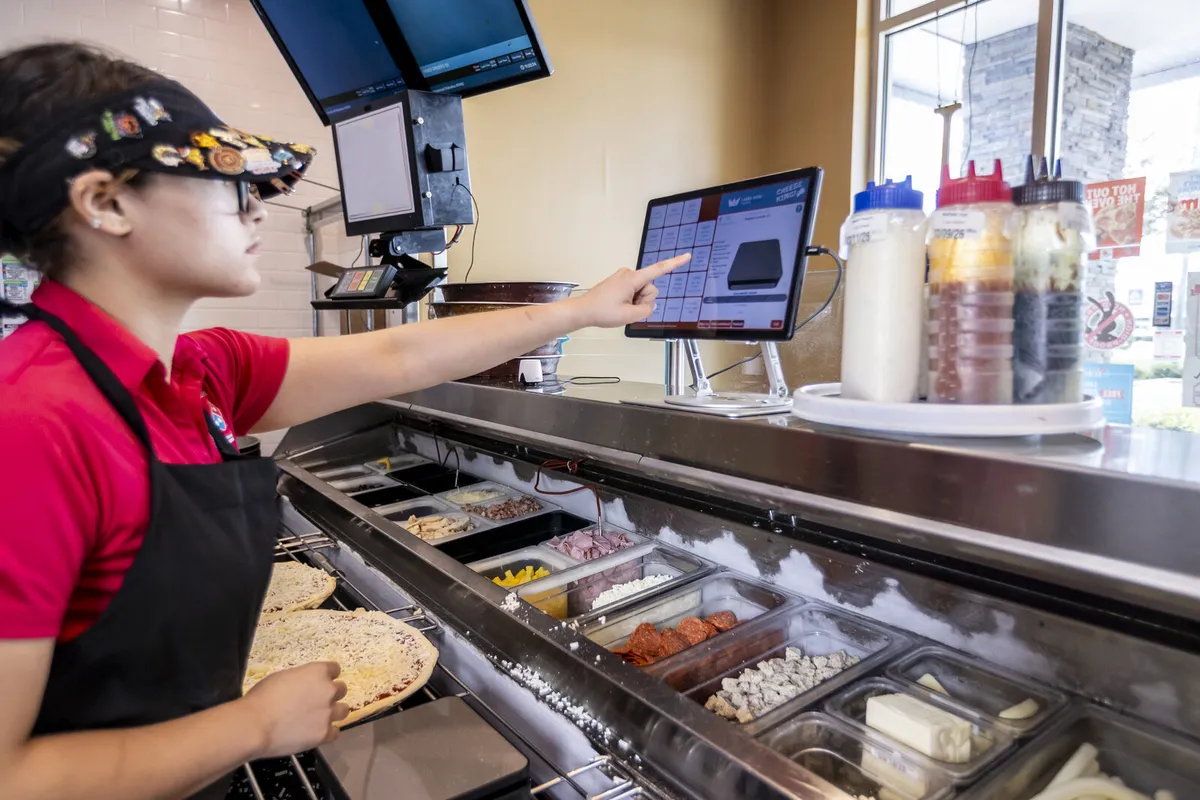
A digital kitchen job aid is a set of on-screen, step-by-step instructions shown at the station where the work happens, so staff follow the build while they make it. Portion King Turbo is restaurant kitchen job aid software that replaces the recipe binder with photo-led builds on a screen at the station, guides each step in order, and logs checks so managers can see how stations are performing. An optional wireless scale adds live portion feedback.
- 130+restaurant brands and chains use Label King
- 200+years of combined restaurant experience behind the product
- 60-daymoney-back guarantee
Restaurant brands that use Label King



Digital Job Aids vs. the Recipe Binder
Most kitchens already have job aids: a binder on a shelf, laminated cards taped to a wall or a poster near the station. Those formats share a few problems.
- They're away from the work. A cook mid-build has to stop, walk to the binder and find the right page.
- They go out of date. Every recipe change means reprinting every copy, and old cards linger.
- They get skipped. Once someone thinks they know a build, they stop checking, and small variations creep in.
- They leave no record. A manager can't tell from a binder whether anyone followed it.
A digital job aid puts the current instructions on screen at the station, in the order the work happens, and the same at every station that uses them.
How Photo-Led, Step-by-Step Kitchen Instructions Work
- Build the recipe once. Each item becomes a guided sequence with a photo for every step.
- Staff follow it at the station. Tap the item and work through each step in order, every time.
- Checks feed the dashboard. Owners and managers see how stations and locations are performing without being on site.
Visual steps work in a kitchen for practical reasons: they're faster to scan than text, they show what "right" looks like, and they remove the guesswork in vague terms like "a handful" or "lightly."
Practical Examples of Kitchen Job Aids
You build job aids around your own menu. These examples show where they help most.
Recipe builds
A burrito station shows each build as a sequence: tortilla, rice, protein, beans, salsa, cheese, fold. A new hire taps the item and follows the photos instead of asking the next station.
Assembly sequences
A specialty sandwich has a layering order that affects how it holds up in a to-go box. The job aid shows each layer in order, so it's built the same at lunch and late night.
Portion guidance
A salad station shows the target amount for each topping with a photo of how it should look. With the optional scale, live weight feedback shows in or out of tolerance.
Prep tasks
A morning prep step, like portioning sauce or assembling a component used all day, laid out as a guided sequence so the opener and the weekend crew prep the same way.
Replace the Binder at Your Busiest Station
Tell us which builds cause the most variation and we'll show you how they'd look on screen.
How Digital Job Aids Help New and Experienced Staff
New hires
Follow the build on screen from the first shift, replacing much of the shadowing and memorizing that line training usually involves.
Experienced staff
A quick reminder when a recipe changes, an LTO launches or someone covers an unfamiliar station. The screen always shows the current version.
Managers
Built-in checks feed a dashboard, so coaching goes to the builds and people who need it. See new-hire training for restaurants.
Job Aids First, Wireless Scale Optional
Portion King Turbo combines on-screen job aids with an optional wireless scale. It's worth separating the two when you evaluate it.
| Job aids (core) | Wireless scale (optional) | |
|---|---|---|
| What it does | Photo-led, step-by-step builds at the station | Live weight against a target and tolerance |
| Required? | Yes, the core of the system | No |
| Best for | Consistent builds, sequences and training | Ingredients where weight drives cost or quality |
Many operations start with job aids and add the scale for specific high-cost ingredients. Pizza operators often use it for cheese; see Cheese King.
What a Kitchen Job Aid Is Not
Digital job aids guide staff while they perform the task. They aren't a learning-management system for scheduling courses, tracking certifications or managing HR training records. For opening, closing and line-check checklists, see Ops King Turbo.
Digital Kitchen Job Aid FAQs
Do I need the scale to use Portion King Turbo's job aids?
No. The wireless scale is optional. The on-screen job aids work on their own.
Does a digital job aid replace our recipe binder?
For the recipes you build into the system, yes. Portion King Turbo replaces binders with photo-led builds on the screen at the station.
Will every location see the same instructions?
Builds and standards can be the same at every location, so a cook trained at one store builds the same way as the rest of the group.
What tasks work best as digital job aids?
Anything with a defined sequence and a visual standard: recipe builds, assembly orders, portioning steps and repeatable prep tasks.
Is this a full training platform?
No. Job aids focus on guidance at the station while staff work. They don't replace your broader onboarding, HR training or certification programs.
Put Instructions Where the Work Happens
A specialist will look at your stations and builds and show you what on-screen job aids would look like in your kitchen. No contracts, backed by a 60-day money-back guarantee.